
Review + Monthly Rewind
How to review a month of habits on iPhone and Mac
A month of records is more useful when you can see what changed. Sum of Days offers two ways to look back: Review for findings and their evidence, and Monthly Rewind for a concise visual summary of the last 30 days.
Begin with a few things you care about
Choose records you can realistically maintain: a reading total, a walking habit, or supported Apple Health values such as steps. Pick the right item type: daily totals add up within a date, habits record that something happened, and status numbers represent a value that continues until it changes.
You do not need to fill every day. Leave unknown values missing instead of entering zero to make a calendar look complete.
Use Review to find a change
- Open Review and choose a period. Compare the current week, month, or year with the previous period. Check the displayed date ranges so you know what is being compared.
- Read a finding in context. Review can surface value changes, changes in recording frequency, standout days, and items that moved together.
- Open the supporting dates. Check the values and coverage behind the finding. More entries and higher values answer different questions.
- Revisit an individual item. Use Item Lens, its chart, or its calendar to inspect the longer history.
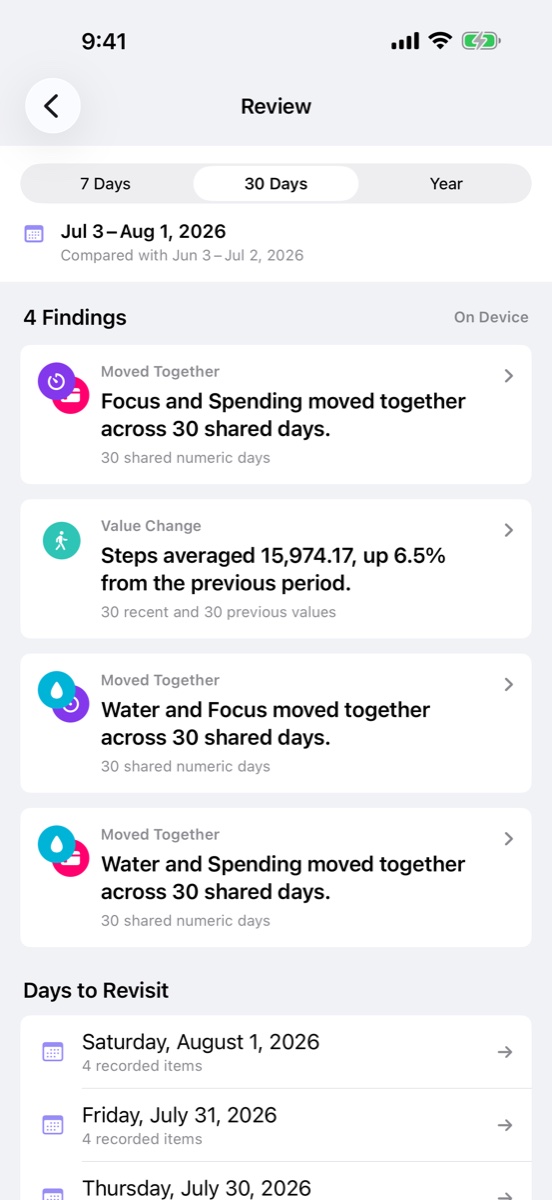
Open Monthly Rewind for a shorter look back
Monthly Rewind gathers up to three verified findings from your last 30 days into a one-page summary. Each description is followed by a visual comparison. Open the full Review when you want more detail or the dates behind a finding.
The summary is created privately on your device. It depends on the available records: a period with too little information may not support a useful finding. The app should not need to invent a conclusion just to fill the page.
Separate the observation from the explanation
For example, a higher average step count means that recorded steps were higher across the compared periods. It does not, by itself, explain why. Check which days contributed, whether coverage is comparable, and any notes you made.
If two items moved together, treat that as something to examine. It does not establish a cause. Your calendar and notes can provide context that a numerical comparison alone cannot.
Keep the next month simple
Decide which records were useful enough to continue. You might keep the same small set, adjust what you record, or add a note when your routine changes. Consistent definitions make later comparisons easier to understand.
Use iPhone for quick entries and Mac for a wider view of the same history when private iCloud sync is enabled. Review and Monthly Rewind process records on device.
For a setup that combines automatic values with personal context, see tracking Apple Health data alongside daily habits.
Start with today.
Sum of Days is free to start, with optional Sum of Days+ access.
Download on the App Store →