
Apple Health + daily habits
Track Apple Health data alongside your daily habits
Step counts tell you how much you moved. Your own entries can add context: a walk you took, a routine you tried, or a note about the day. Sum of Days keeps supported Apple Health values alongside the things you record yourself.
Start with one Health item and one habit
For a simple setup, choose steps from the Apple Health items and create a habit for an evening walk. The steps come from Health; the walk is something you record. Keeping these separate lets you see both without treating a step count as proof that you completed a particular routine.
- Add a supported Apple Health item. Examples include steps, weight, exercise time, walking and running distance, active energy, stand hours, and sleep.
- Approve the Health categories you want to connect. Sum of Days reads or writes only the categories you authorize. Check the Apple Health connection in settings if values do not appear.
- Add your own habit or daily total. Use a habit for a check-in, or a daily total for something that adds up during the day, such as pages read.
- Record the context you want to remember. A short note can help explain what happened when you return to that date.
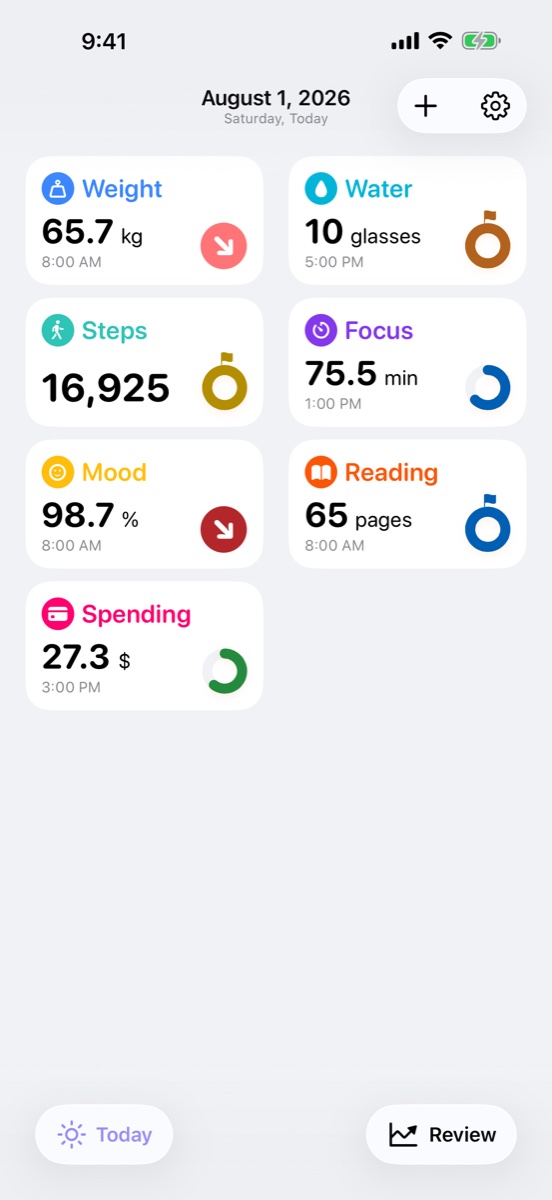
Know which values you can edit
Steps and exercise time are imported from Apple Health and remain read-only in Sum of Days. You can still add a note for the day. These imported totals update as one entry per date.
If you want to record weight without connecting it to Health, create Weight from the Number: Status category instead of choosing its Apple Health version. It stays separate from Health.
Read the same history on your other devices
One device connects to Apple Health and imports values there. With iCloud sync enabled, the resulting Sum of Days records can sync through your private iCloud storage to your other devices. You can then review that history on iPhone, iPad, or Mac.
This distinction matters: viewing a synced Health record on Mac does not mean the Mac is importing it directly from Apple Health.
Look for changes after you have recorded for a while
Open an item to inspect its chart or calendar, or use Review to compare periods. A higher step average is a change in recorded activity. Two items moving together does not establish that one caused the other.
A day without a record is missing information, not automatically a zero. Check the underlying dates before interpreting a comparison.
Your records stay private
Core records stay on your devices and, when enabled, in your private iCloud storage. Review and Monthly Rewind are generated on device. Read the privacy policy for details.
Next: review a month of habits and Health records.
Start with today.
Sum of Days is free to start, with optional Sum of Days+ access.
Download on the App Store →